For the past few years, I've been struggling with writing blogs. Mostly because I was lazy and it wasn't interesting to do so. I switched platforms from blogspot, to wordpress, then ghost, then back to blogger, ... Not so long ago, I stumbled upon a youtube video about the indie web movement. The concept looked and sounded fascinating to me. I also enjoy retro stuff so I decided to make a blog on neocities.
But then I hit a wall, how do I setup a website on neocities? Do I have to add an html page individually whenever I want to write a new post or a new page? Is there an easy way to automate everything? Can I see how things would look like before publishing them?
Short answer: yes. Via a static site generator (SSG).
To be honest, I wasn't familiar with what SSG was and being a .NET programmer, I'm so used to frameworks, database, ... It was a struggle to really understand what SSG is. In short, let's say you have a page that'll show detail information of 50 different cakes. You're not going to create 50 individual pages manually. You'll have a single template, a json file with info on those 50 cakes, run the json file through a machine and that machine will produce 50 pages using the same template but with different info on each cake. In this case, the machine is the SSG, the json file is markdown files.
Okay, why Elixir tho, didn't I mention I was a .NET programmer? Because I like how EASY it is to pattern match stuff and the functional paradigm of Elixir introduced me to a whole new way of programming. I'm taking this a challenge to maintain a blog while improving my Elixir skill.
What you need: a laptop or pc with at least 2GB of RAM, an internet connection, this post and an OS of your choosing.
At the time of this post, I'm using Windows (yike! I know but CSP can't run on linux and I despise mac) with WSL - Windows Subsystem for Linux. I recommend anything BUT native Windows. So Linux, WSL, BSD, Mac OS are all good.
Installation:
- Install git, wget, curl and build tools (build-essential for ubuntu, base-devel for arch, development-tools for fedora, ...)
- Install asdf by following this guide asdf-vm. My way is to download the Precompiled binary and put it under /usr/local/bin.
- Install plugins: erlang and elixir
- erlang: asdf plugin add erlang https://github.com/asdf-vm/asdf-erlang.git`
- elixir: asdf plugin add elixir https://github.com/asdf-vm/asdf-elixir.git`
- Install erlang version first (recommended)
- Read Before asdf install`** first and follow the guide (based on your OS)
- Install an erlang version. Before doing this, you might want to do a quick check on which erlang-OTP version, elixir is currently supporting by running:
asdf list all elixir
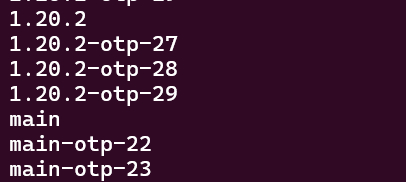
- 1.20.2-otp-29, notice number 29 after otp, that means we need to install erlang version 29
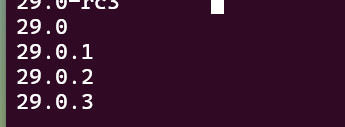
- A quick asdf list all erlang reveals a couple of erlang 29 versions. We'll install the latest one (29.0.3): asdf install erlang 29.0.3. If you're using VM with less than 2GB of ram, it will most likely crash during erlang installation. To avoid this, create a 2GB swap on your VM. This installation might take 10 minutes.
- Install elixir version
- Install the latest by following the same with asdf list all elixir and then asdf install elixir 1.20.2-otp-29. DO NOT install elixir with main or master in its name. This will take at most 1 minute.
- Set erlang version asdf set -u erlang 29.0.3 then set elixir version asdf set -u elixir 1.20.2-otp-29. You can check all the installed versions by running asdf list
- Install tableau hex
mix archive.install hex tableau_new

mix tableau.new my_awesome_site
All the installation is pretty much done by now. You can read Getting Started for more details. I'll update this post occasionally with how to use Tableau.
How to use
placeholder